10 free (and inexpensive) project management software for nonprofits remote teams
Whether you’re a nonprofit with a brick-and-mortar office or running an entirely remote team, working with projects can be daunting. Thankfully, there are many project management software out there to help you manage tasks and projects with employees and volunteers. However, not all tools are the same. We searched the web to bring you the best nonprofit project management software for remote teams and those working in offices. Whatever your need is, you will find your ideal tool here.
Trello
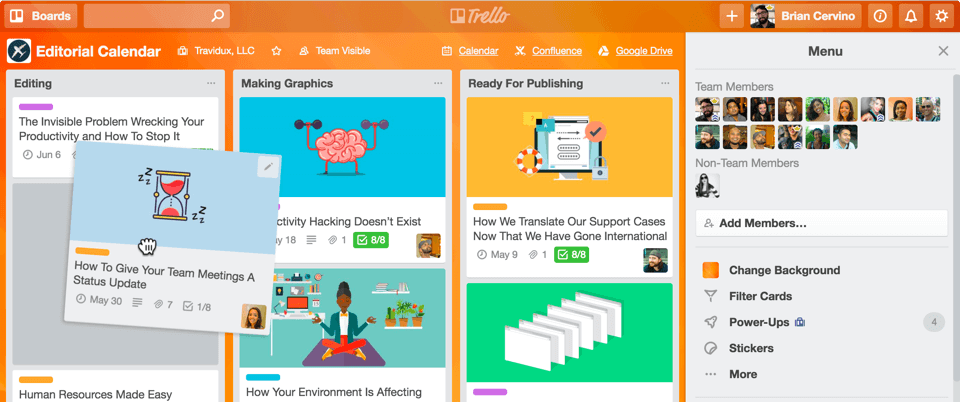
Trello is one of the simplest project management software for nonprofit remote teams, as well as for in-house teams. Think of it as a digital whiteboard, where each note represents a task, assigned to your nonprofit team members or volunteers. As a collaboration tool, Trello helps you and your team to organize your work through whiteboard-like tasks – which inform you what employees or volunteers are working on, the deadlines for projects assigned to teams, the progress of all tasks ( started, in progress, in review, or completed), and a lot more. Notable features of the Trello app include:
- A customizable and flexible dashboard
- Ability to tag and mention team members
- Provides desktops and mobile apps
- An intuitive project management interface
- Customizable individual task colors
- As power-ups for users to add other extensions, such as time-tracking software directly.
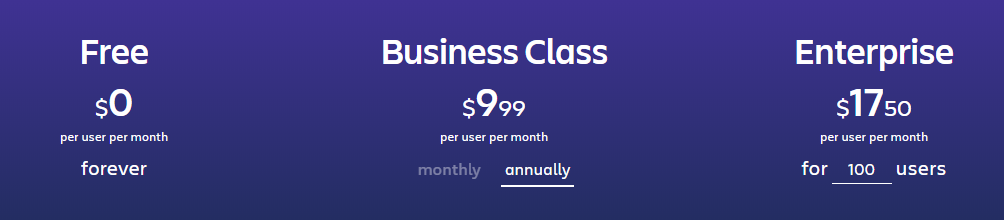
With Trello, nonprofit teams can organize their day, plan their work schedules, save important work tips, and more. The software is inexpensive, and nonprofits with smaller teams can use the free version forever. However, if you’re a big team and looking for more power in your team management, then the business or enterprise plan would do.
Trello pricing
G Suite & G Suite for Nonprofits from Google
If the “G” in G Suite makes you suspect this is from Google, then you’re right. G Suite Google’s Business tool is built for collaboration, document sharing, and productivity. G Suite is a combination of Gmail and Google Docs, which are both free, but with robust apps and interface included to make it more powerful for business users. If you’re a nonprofit, you can use all the basic features for free by opting for the G Suite for Nonprofit app. Generally, the G Suite package comes with the following tools:
- Gmail – for business (in this case, your nonprofit)
- A calendar – for setting and planning events and meetings
- Keep – making and saving notes
- Google Meet – for video conferences, which is more useful in the work-from-home era.
- Drive – for storing and organizing files in the cloud.
- Sheets – for creating and managing spreadsheets.
- Docs – for creating and managing documents
- Forms – for creating forms for your surveys
- As well as a wide range of tools and extensions in the G Suite marketplace.
Asana
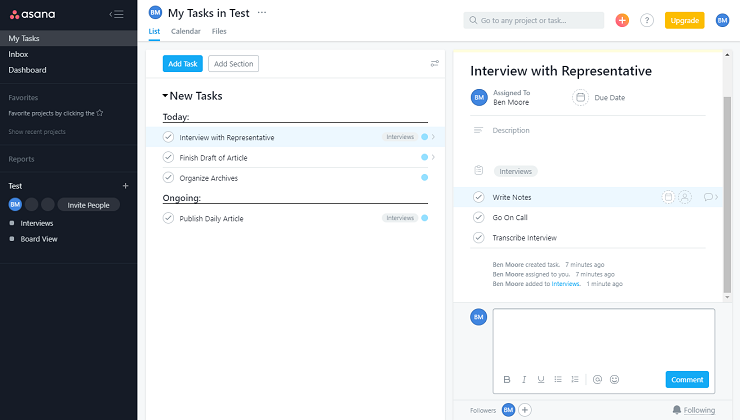
Although you can use it completely free, Asana is one of the best and easiest-to-use nonprofit project management software for remote teams that offers even more power for paid versions. It’s a task management application that nonprofits can use to organize tasks and create to-do items for volunteers and employees. In addition to its basic features of creating, assigning, and tracking tasks, Asana provides the following as well:
- Add or tag users on a task – they get notified through email
- Add attachments from Google Drive, DropBox, and more
- Lots of templates to save your nonprofit ample time
- Asana hosts its data in “secure SSAE 16 audited data centers via Amazon in the US.” And secures its connections using at least the TLS 1.1 protocol.
- Integration with Slack and Microsoft, and many other tools
Asana Pricing
Asana offers a free version, which cannot give you more features, but if you’re looking for a more powerful interface and intuitive features, then the 10.99/month/user plan is a great option. While this is good for nonprofits with small teams, it will be very expensive for teams that want to include many volunteers.
Basecamp Personal
For nonprofit teams looking to manage projects in one single place, Basecamp could be the ideal software for this. Basecamp is a project management platform, and an all-in-one tool, with great ways for your nonprofit to schedule tasks, create and manage teamwork, manage to-dos, and upload documents. It also comes with chat features, messaging, and regular check-ins. For more power, and for nonprofits with large teams and hundreds of volunteers, the business plan, which comes at a $99/month flat rate, is good. But if you’re a nonprofit, you may not need this plan – you need the Basecamp Personal plan.
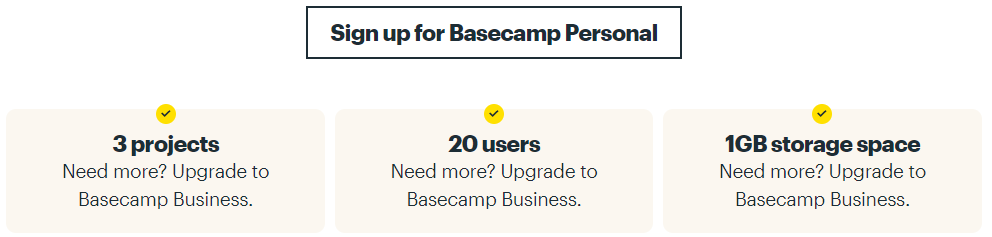
Basecamp Personal is completely free – but built for freelancers, families, and personal projects. But if you’re a nonprofit just starting out or with a few team members and volunteers, you can leverage this plan for your projects. Basecamp is available on Android, iOS, Mac, and PC. The image below shows what you get with a Basecamp Personal account.
Keela
Keela is one of the best nonprofit project management software for remote teams not just because it’s built from the ground up as a tool for nonprofits, but its all-in-one CRM comes with great features for managing tasks. Apart from helping nonprofits manage donors, Keela is great for creating donation pages, and helping with online giving, email campaign management, reports, and analytics for better decision-making. Great features of Keela include:
- Ability to create and manage a centralized contact database
- Set communication priorities and store conversations
- Create and send donation receipts
- Create and send thank you notes to donors
- Integrations with Quickbooks, PayPal, Eventbrite, and more tools that nonprofits are using.
- Assignment and work tracking for teams
If you’re in the market for nonprofit project management software built as an all-in-one tool, that is user-friendly, comes with seamless data transfer capabilities, and streamlined communications, Keela is one of the best choices out there.
TeamWork
Teamwork is a project management software for nonprofit remote teams that can leverage to create and manage tasks, streamline collaboration, and build resilient work environments. It comes with a complete CRM that nonprofits can use to increase their engagement. Plus, it’s a chat platform for instant messaging for teams that enables content collaboration, and more. Most notable features include:
- Great integrations for the tools of your choice, including Gmail, DropBox, Slack, Microsoft, and more.
- Comes with a time-tracking app for teams to monitor productivity
- Available on many platforms, including iOS, Android, Desktop, and a Chrome Extension.
- Great templates for nonprofits to use to create and manage projects – saving more time.
TeamWork Pricing
For nonprofits with teams of less than 5, Teamwork’s free plan is a great place to start managing all your projects. The free plan comes with 2 maximum projects at a time, 5 team members, subtasks, and a limited board view – but it’s great for small nonprofit teams. If you want more power, you can go for the Pro plan, which is $10/month/user, or the Premium plan for $18/month/user.
Notion
Notion is undoubtedly one of the most comprehensive project management software for nonprofit remote teams. It provides the building blocks for managing projects, with unmatched resources for teams to create, edit, and fine-tune their projects. It’s highly customizable and a great all-in-one platform for task management, collaboration, file storage, calendars, and more. Key features:
- Great integration with multiple tools, including Google Calendar, Google Drive, Typeform, and more.
- Create notes, organize tasks, and assign projects.
- Tag or mention team members in Notion – with a notification sent to those mentioned.
- Notion allows teams to view their tasks and projects in multiple views
- Many templates for teams to use for creating tasks and managing projects – replicate pages and more.
- Some of the best collaborative note-taking features – with great content types allowed
- Ability to import data from many other software for use in Notion.
Notion Pricing
The free “Personal” plan is a great place to start for nonprofits with 1 to 3 teams. The free plan offers unlimited pages and blocks, the ability to share with 5 guests and syncing capabilities with different devices. If you want more power for your nonprofit, the “Personal Pro”, which comes at $4/month, or the “Team” plan, which is $8/month per member, are great options.
Monday
As a project management tool, Monday has earned a name as one of the best in the industry, enabling teams to manage projects and tasks and work together collaboratively. Whether you’re a small nonprofit team or a large organization with many volunteers, Monday.com is a great software for project management. Great features of Monday.com:
- A highly customizable workflow interface
- Time tracking for teams to measure productivity
- Ability to integrate your software of choice.
- Automated notifications – to keep everyone on the same page
- Different views of the same projects – timeline, calendar, and more.
- Excellent project visualizations
Pricing
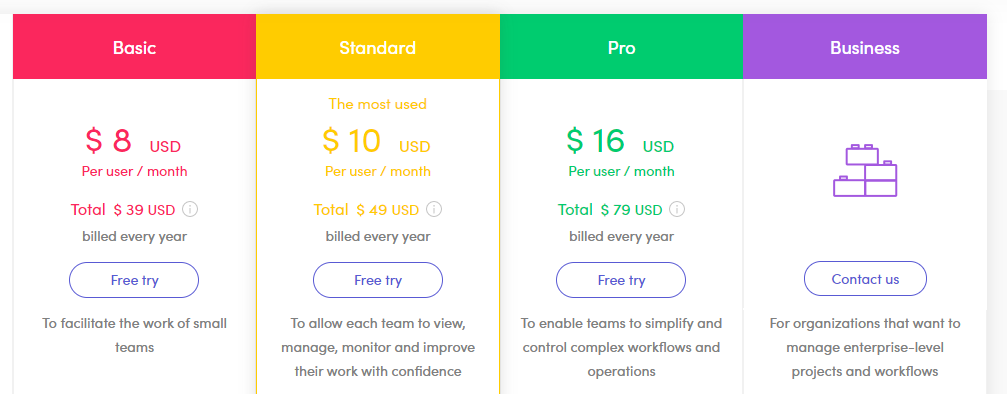
Monday.com has four pricing options. The prices are for organizations with 2, 5, 10, 15, 25, 50, 100 and 200 users. The Basic Plan, for example, is for five users at $39 per month. If you’re going for the 100 users plan, it costs $799 per month. Organizations with over 200 users must contact monday.com for a quote.
Wrike
Wrike is a great nonprofit project management software for remote teams and helps teams to work collaboratively whether they’re located in the same office or working remotely from around the world. It helps teams to get work done, create and assign work, and aid in planning. Wrike’s great features:
- Organizing, planning, and tracking projects
- Comes with a variety of views, including table, workload, board, lists, and timeline among others
- Enables great collaboration among teams – with teams working together, assigning, and approving work seamlessly.
- Excellent customization features for teams – customize workflows, project folders, task structures, and fields.
- Automate your workflow – and save more time.
Wrike’s Pricing

There are four different plans for users on Wrike. The free plan is okay for a small team, but for a nonprofit looking to use Wrike for great work, the professional or business plan are great options.